Flow Processor
Overview and Key Concepts
Flow processors are objects for which the input rate is always equal to the output rate.
FloWorks supports various shapes of flow processors such as flow pumps and flow valves.
In practice pumps are active components while valves are passive. In FloWorks, the two objects are
functionally identical, you can decide which one you use based on reality or your preference.


Pumps and valves
Pumps and valves are typically used for the following purposes:
-
**For realistic modelling.**By default, the flow rate for the flow pump and a flow valve are set to be non-constraining. Therefore they do not influence the flow rates in the model. You may still want to include these objects because you have a model background or are modelling a situation where there would be a pump or a valve in reality.
-
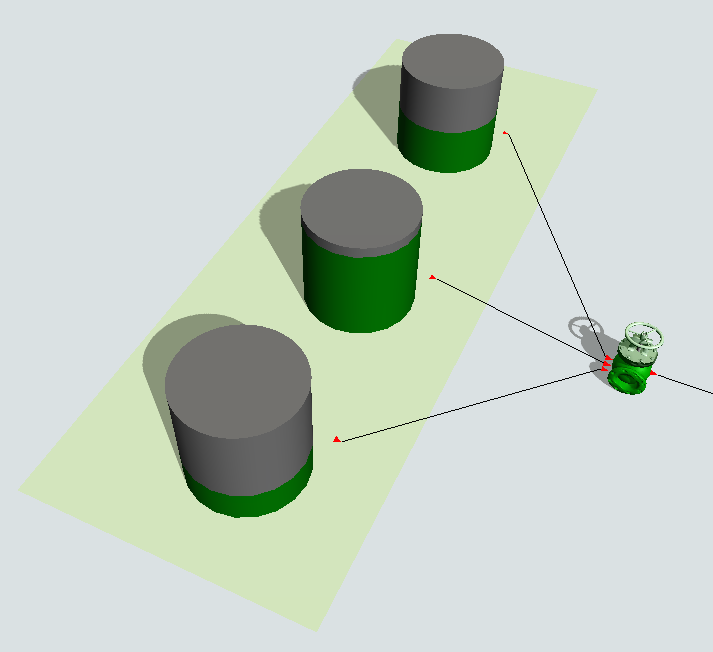
**To restrict flow rates.**Depending on the situation, it may be convenient to have a single point in the model where you can define the maximum flow rate through (part of) the fluid network. For example, a pump or valve can serve as the exit point for a tank pool, where you can set the outflow rate from the tank pool on the pump or valve, regardless of the active tank, rather than setting it on all tanks in the pool separately.
-
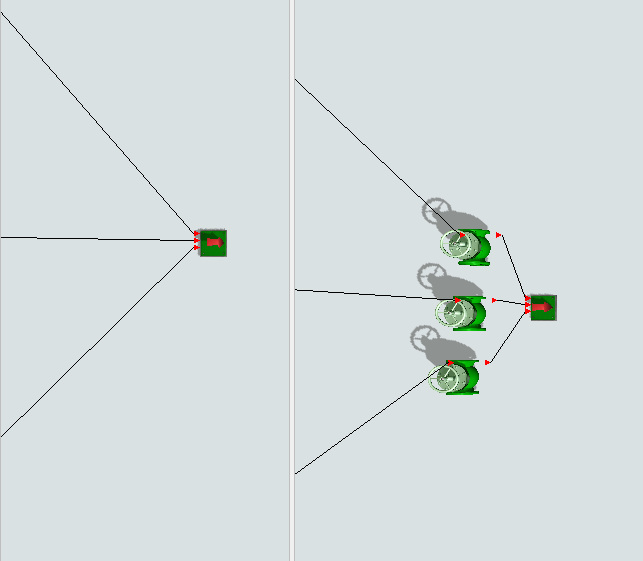
**For collecting statistics.**Each object collects its own statistics, but it is not possible to collect statistics for each port separately. Consider the case to the left below, where three connections are entering a sink, and assume that each of those connections actually represents a complex sub-network where it is hard to find a single point to measure the total flow. If you want to measure how much is flowing into the sink through each port, you can insert three pumps or valves and log their throughput, as shown to the right.
Blenders, pumps, and valves
A blender is a flow processor (a pump or valve) with its inflow rule set to "Balanced flow on rate %". Similarly, a splitter is a flow processor (a pump or valve) with its outflow rule set to "Balanced flow on rate %". You can switch between pumps, valves, blenders and splitters using the Change Shape dropdown in the Properties.
Blender
The blender is similar to the pump and valve, except that it has its inflow rule set to "Balanced flow on rate %" by default. The blender always makes sure it is collecting the correct percentages. If the inflow rate is reduced on one of the input ports, all other ports will be reduced to keep the ratio between the inflow rates fixed. This implies in particular that if an upstream object is starving one input port, that the blender will also stop the flow through all other input ports.
Splitter
The splitter does the same on the output side: it has its output rule set to "Balanced flow on rate %" by default. It always makes sure it is releasing the correct percentages. If the outflow rate is reduced on one of the output ports, all other ports will be reduced to keep the ratio between the outflow rates fixed.
FloWorks' pump / valve and Flexsim's fluid processor
The main difference between the pump and valve in FloWorks and the fluid processor in FlexSim's fluid library, is that the FlowObject objects cannot hold any content. They force their input rate to be equal to their output rate, reducing one if the other one drops. If you need to back up material when the output rate is reduced, use a flow tank or mass flow conveyor . If you require a loss factor on the pump, connect the final output port to a flow sink with the appropriate inflow rate.
Events
The flow processor uses the standard events that are common to almost all FloWorks objects. See FloWorks Triggers for an explanation of these events.
States
For statistical purposes, the flow processor's FloWorks state profile will be in one of the following states at various points during a simulation run:
Idle
The flow processor does not have any flow.
Processing
Material is flowing at a non-zero flow rate.
Properties Panels
The flow processor object uses the following properties panels:
-
Statistics
-
Visuals
-
Labels
-
Shape
-
Flow Object
-
Ports
-
Triggers
Properties
The Flow Processor object shares several properties with all flow objects:
- Flow Object Properties
Custom coding
You may control the behavior of a flow pump or flow valve dynamically by writing FlexScript, for example
in a Script window or by changing the code behind one of the options in an object trigger.
Flow processors are instances of theFlowObjectclass, see the class reference
for information about its properties.
Note that flow processors will never store material and therefore their input rate must be equal to their output rate.
The maximum flow rate can be set either on the input, or on the output; the other value will automatically be changed too.
Dynamically controlling the ratio
For the blender and splitter in particular, you may want to dynamically control the flow rate ratio between the input or output ports.
Useobject.input.ports[i].ratioto get and set the ratio of the flow through input porti.
(Of course the same applies withinputreplaced byoutput).
Just as when manually entering the ratios, the sum will be normalized to 100% automatically, unless the ratio forallthe ports is set to zero.